
High Performance Computing Cluster Facility
HPC Cluster Live Status
Loading…The High Performance Computing Cluster (HPCC) is a centralised computing facility of the Department of Chemistry, established to support the advanced research needs of faculty members and their research students. It brings together multiple compute nodes, high-speed interconnects, and large-scale shared storage into a single coordinated system, allowing researchers to run calculations that would be impractical or impossible on an ordinary desktop workstation.
The facility supports a wide range of scientific work — from solving complex equations and running large-scale molecular and materials simulations to analysing datasets, visualising results, and building interactive models. Jobs are managed through a workload scheduler that allocates computing resources fairly among users, so that many researchers can share the cluster efficiently and run their calculations in parallel.
A variety of both licensed and open-source application software is installed and maintained on the HPCC, spanning quantum chemistry, molecular dynamics, and data visualisation. Centrally managed software modules and ready-to-use job templates make it straightforward for researchers to get started, while the underlying hardware and software environment are kept up to date and supported by the department’s HPC administration.
By pooling computational resources in this way, the HPCC enables research that depends on intensive numerical computation, accelerates the pace of scientific investigation, and provides students with valuable hands-on experience in modern computational methods.
The computing facility is funded by the Department of Science & Technology, Ministry of Science & Technology, Government of India, under its FIST (Fund for Improvement of S&T Infrastructure) Program.
Publications by HPC Cluster Users
- Dhiksha Sharma, Nayan Prakash, Mokshi Sharma and Tapta Kanchan Roy*, Benchmarking the Performance of Different Density Functionals for Quantum Anharmonic Vibrational Spectral Calculations, Chemistry: An Asian Journal, (2026), 21, e70989
- Mokshi Sharma and Tapta Kanchan Roy*, Hybrid Quartic Force Fields with Atom-Specific Basis Sets: An Efficient Route to Calculate Anharmonic Vibrational Spectra, Phys. Chem. Chem. Phys. (2026) 28, 12348–12361
- Mokshi Sharma and Tapta Kanchan Roy*, A reduced-parameter variational strategy for accelerated evaluation of thermal density matrices via quantum effective harmonic oscillators approach. Phys. Chem. Chem. Phys. (2025), 27, 3139.
- Dhiksha Sharma and Tapta Kanchan Roy*, Deciphering the interplay of different electronic and vibrational structure theory parameters for the computation of anharmonic molecular vibrations. Phys. Chem. Chem. Phys. (2025), 27, 17464.
- Dhiksha Sharma, Jyoti Devi, Avantika Sharma, Mokshi Sharma, Meenakshi Raina, Akriti Jamwal and Tapta Kanchan Roy*, Accuracy of DFT quadrature grids for the computation of quantum anharmonic vibrational spectroscopy. Vibrational Spectroscopy (2025), 139, 103810.
- Gautam Deo, Mrityunjay K. Tiwari, Unveiling the n→ π* Interactions in Main-Group Carbonyl Complexes. Dalton Trans., 2026, 55, 9958-9968. DOI: 10.1039/D6DT01195K, Royal Society of Chemistry (July 2026)
- Gautam Deo, Mrityunjay K. Tiwari, Probing the effect of substituents on n → π* interactions in organic nitrile–pyridine complexes: a quantum chemical study, Royal Society of Chemistry (November 2025)
- Vijay Kumar Vishvakarma, Gyanendra Kumar, Sandeep Kumar, Bhawna, and Dhanraj T. Masram, Effective Flame-Retardant Coatings for Expanded Polystyrene Foam: A Study Based on Deep Eutectic Solvent and Graphene Oxide, ACS Omega (June 3, 2025)
- Sumit Kumar, Aditi Arora, Gautam Deo, Mrityunjay K. Tiwari, Jyotirmoy Maity, Brajendra K. Singh, Microwave-assisted synthesis of base modified Furo[3,2-c]quinolone nucleosides and insights into their photophysical properties, Dyes and Pigments (September 2025, 112826)
- Aditi Arora, Sumit Kumar, Shivani Sapra, Gautam Deo, Mrityunjay K. Tiwari, Brajendra K. Singh, Sandeep Kumar, Design and synthesis of a carbohydrate-derived chemosensor for selective Ni(II) ion detection: A turn-off approach, Carbohydrate Research (2025)
- Priyanka Aggarwal, Ram Kuntal Hazra, Bharti Kapil, Shivalika Sharma, Igor Di Marco, Analytical treatment of the Yukawa screened Coulomb interaction in a plane-wave basis, Physics Open 22 (2025) 100243
- Leena Aggarwal; Sayan Karmakar; Parbati Biswas, Differentially heterogeneous hydration environment of the familial mutants of α-synuclein, J. Chem. Phys. 161, 155102 (2024)
List of Analytical, Computational, and Statistical Packages available:
| Software | Version | Research domain |
|---|---|---|
| Amber | 24.0 | Molecular dynamics — drug discovery, biomolecular simulation |
| GROMACS | 2020.7 | Molecular dynamics — protein folding, membrane simulations |
| NAMD | 2.14 | Molecular Dynamics — CHARMM force fields, membrane proteins |
| Gaussian | G16 | Quantum Chemistry — DFT, TD-DFT, NMR, Reaction Mechanisms |
| GAMESS | 2024.2.1 | Quantum Chemistry — HF, DFT, MP2, CCSD(T), TDDFT, SADPOINT |
| NWChem | 7.2.2 | Quantum Chemistry — SCF, DFT, TDDFT, MP2, CCSD, NMR, Geometry Optimization |
| ORCA | 5.0.4 | Quantum Chemistry Package |
| COMSOL | Finite element — heat, fluid, electromagnetic modelling | |
| Mathematica | Mathematical computation and symbolic algebra | |
| Olex2 | Crystal structure determination and refinement | |
| JupyterLab | Browser-Based Visualisation on duhpc |
Demonstrated Performance (MD Simulation)
| Software | Benchmark System | Hardware | ns/day | vs CPU |
|---|---|---|---|---|
| GROMACS 2020.7 | 1AKI lysozyme 35k atoms | NVIDIA V100 GPU | 341 | 44× |
| Amber pmemd.cuda | DHFR+FOL 24k atoms | NVIDIA V100 GPU | 370 | 48× |
| Amber pmemd.cuda | DHFR 23k atoms (benchmark) | NVIDIA V100 GPU | 622 | 81× |
| NAMD2 2.14 | ApoA1 92k atoms | NVIDIA V100 GPU | 39 | 5× |
How to Connect Cluster
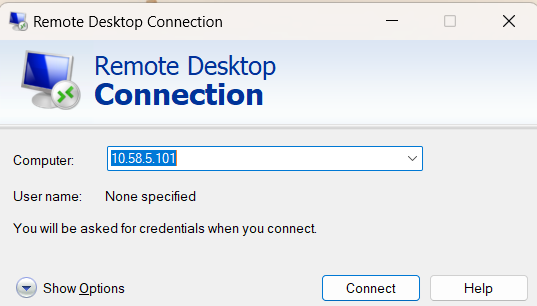
Users may login from anywhere at Delhi University LAN/WAN and public network (through DU VPN) simply by doing ssh command or can use Putty. “Windows Desktop Connection” or “MobaXterm” can be used for GUI mode access.
ssh user_name@10.58.5.101
user_name@10.58.5.101’s password:
Download
For any technical help regarding HPCC you may contact HPC Adminstrator Mr. Imran Ghani, through e-mail on ighani[at]ducc[dot]du[dot]ac[dot]in